• Zur Metanavigation
  • Zur Hauptnavigation
  • Zur Suche
  • Zum Inhalt
  • Zur Subnavigation
  • Zum Seitenfuß
  • University of Hamburg
  • For journalists
  • Staff Service Portal0
  • STiNE
https://www.kus.uni-hamburg.de/aktuelles.json?recentnews=true
  • Institutions and target groups
    • Einrichtungen
      • Faculties

        • Faculty of Law
        • Faculty of Business, Economics and Social Sciences
        • Faculty of Medicine
        • Faculty of Education
        • Faculty of Humanities
        • Faculty of Mathematics, Informatics and Natural Sciences
        • Faculty of Psychology and Human Movement Science
        • University of Hamburg Business School
      • Services

        • Study Information Net STiNE
        • Surfmail
        • Exchange
        • Staff Service Portal
        • Learning Platforms
        • Katalogplus – Catalogue of Hamburg Libraries
        • SharePoint
      • Student facilities and services

        • Campus Center
        • Career Center
        • PIASTA
        • AStA (student council)
        • University Sports
        • University Music
        • Family Office
        • University Language Center
        • General Languages
        • Office of Affairs for Students with Disabilities or Chronic Diseases
        • Departmental libraries
        • Healthy Campus
      • Further facilities and services

        • The Cluster of Excellence CLICCS
        • The Cluster of Excellence CUI
        • The Cluster of Excellence Quantum Universe
        • The Cluster of Excellence Understanding Written Artefacts
        • Hamburg Research Academy
        • Pier Plus
        • Hamburg Center for University Teaching and Learning (HUL)
        • Hub for Crossdisciplinary Learning (HCL)
        • CEN
        • Museums and collections
        • University Archives (in German)
        • Regional Computing Center (RRZ)
        • University Administration
        • Knowledge Exchange Agency
        • The Unikontor Shop (in German)
    • Target groups

      • Prospective students
      • Students
      • International prospective students
      • Young researchers
      • Researchers
      • Instructors
      • Staff
      • Prospective continuing education students
      • Alumni
      • Journalists
      • Refugees (in German only)
    Close
  • Language
    • English
    • Deutsch
  • /en/sitemap.json
University of Hamburg - to research, to teach, to educate and form, to homepage

RRZ

Regional Data Center
(RRZ)
  • Support
    • RRZ-ServiceLine/STiNE-Line
    • RRZ-ServiceDesk
    • RRZ-ServicePortal
    • RRZ Feedback
    • RRZ Portfolio
    • Application Forms
    • Instructions/Glossary
    • FAQ
    • Policies
    • Support Forms
  • Services
  • ID & Authentication
    • Apply for an identifier
    • Forgotten/change password
    • Set up two-factor authentication
    • Managing identifier groups (group manager)
  • Innovation
    • Research & Education
    • Organisational Development
  • About Us
    • RRZ News
    • Mission statement
    • Map / Directions
    • Operating Hours / Opening Hours
    • RRZ Staff
    • Careers
    • Organizational Structure
    • Webinars
    • Equal Opportunity at the RRZ
    • History of the RRZ

Photo: UHH, RRZ/MCC

  1. UHH
  2. RRZ
  3. Services
  4. More services
  5. Digital Teaching
  6. Particify

Particify

Particify is a web-based application for creating interactive surveys, live feedback, and real-time voting. Particify is particularly useful in interactive teaching to actively engage students and promote learning success. With Particify, questions can be created in various formats to test participants' understanding. The results are displayed in real time, allowing for immediate feedback. In addition, discussions and polls can be designed interactively to promote exchange and collaboration.

The platform is ideal for lectures, seminars, and workshops to convey knowledge in a dynamic way and increase interactivity.

Access and further information

The application can be accessed at the following URL: Particify - University of Hamburg.  Registration and use are carried out with the respective User-ID.

Further links

Login to Particify UHH
Manual
Didactic Notes - Possible Uses of Particify
Frequently Asked Questions (FAQ)
Support & Contact
Features

Particify's various interactive features not only convey content, but also actively reinforce it. The following features help to make courses more dynamic and promote exchange. Click on the individual areas to learn more:

Information about Particify

Rooms

Rooms enable the organization of content and interactions. Here, events can be structured, questions asked, and surveys conducted.

You can find more information about room management, room creation, and settings in the documentation.

Announcements

Announcements can be used to inform participants about dates and news. These can be accessed via the bell icon in the header bar.

By default, all announcements for rooms that have been entered and created are displayed. Using the “All rooms” function, they can be filtered by individual rooms.

More information can be found in the documentation.

Questions and Answers (Q&A)

Participants can ask questions and provide feedback in the Q&A section. Contributions can be upvoted or downvoted so that particularly relevant content is prioritized.

You can find more information about the control bar, context menu, moderation, and other functions in the documentation.

Question Series

Question series allow you to bundle and structure multiple questions. They enable interactive quizzes, surveys, or knowledge checks in various formats.

You can find more information about creation, formatting (Markdown & LaTeX), management, live mode, and other functions in the documentation.

Live Feedback

Live feedback allows participants to provide feedback in real time. This enables direct interaction and helps to immediately identify moods or comprehension difficulties.

You can find more information about the functions and settings in the documentation.

Presentation

Presentations allow content to be displayed interactively and combined with surveys or questions. This actively involves the audience in the presentation.

You can find more information about the presentation functions and settings options in the documentation.

Navigation

The navigation in Particify allows for easy control and quick access to all functions and areas of the application. It helps you quickly find your way around events, rooms, and content.

You can find more information about navigation and the corresponding functions in the documentation.

Particify Overlay

The desktop overlay for Particify allows for better integration of your live polls with the UHH service Particify. These visualizations promote interactivity and are ideal for courses, workshops, or webinars. The overlay appears on top of the presentation and allows quick access to all relevant Particify functions without having to switch between different applications. This allows you to directly access question series for presenting results.

Using the overlay

  • Particify Overlay Download
    • Note: The tool is currently only available for Windows computers.
    • For FMD devices (devices supported by RRZ): If you have an FMD device, you must purchase the software in the Self Service Portal. Click here to access the service.
  • For other Windows computers: The software can be downloaded directly from the web application.
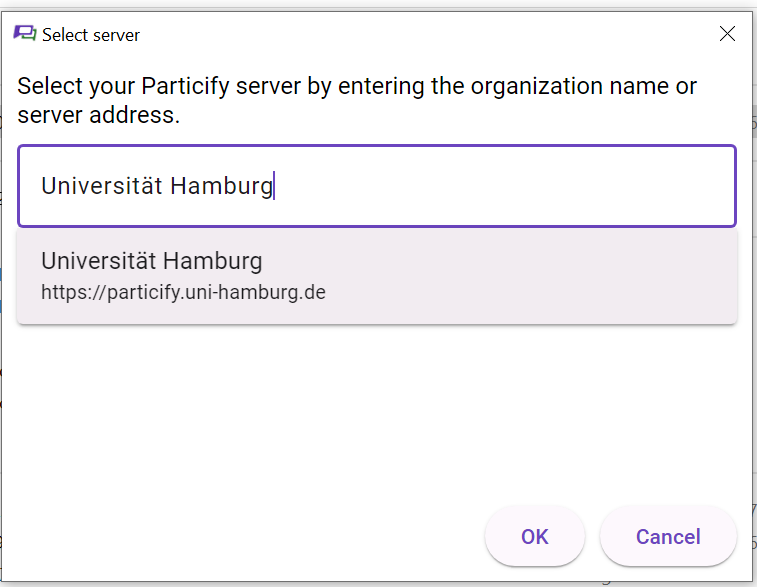
    • To do so, follow these steps
    • In step 3 of the instructions, search for “Universität Hamburg”:
  • Activation: Start the Particify Overlay software and connect to your Particify room. You can then use the overlay in your presentation (e.g., PowerPoint).
  • Positioning: You can place the overlay in a corner of your screen to ensure an optimal view of your presentation.
  • Usage: Move your mouse over the overlay to display controls and functions. This allows you to directly access question series for presenting the results.
  • Interaction: Use the functions displayed in the overlay without leaving presentation mode.
The overlay ensures that your presentation remains undisturbed while you can access relevant tools.

Navigation

  • Login to Particify UHH
  • Manual 
  • Didactic Notes - Possible Uses of Particify 
  • Frequently Asked Questions (FAQ) 
  • Support & Contact 
  • Features

News

  • 4 March 2025|Maintenance

    Particify maintenance on 19.03.25 from 15:30 to 16:30

    Due to an update, Particify will unfortunately not be available on March 19, 2025, between 3:30 and 4:30 pm. We will try to keep the actual downtime during this period as short as possible and apologize for the interruption. Details of the...

Archive of current news

Support & Kontakt

Support & Contact

RRZ-ServiceLine
Tel: +49 40 2395-27790
Email: rrz-serviceline"AT"uni-hamburg.de

If you encounter any issues with the application or require assistance, we are happy to assist you.

How to contact us:

Simply send us an email with your request to

rrz-serviceline"AT"uni-hamburg.de.

Your request will be recorded in our system and processed by our support team.

Please include a detailed description of the problem in your message, including error messages, affected functions, and the time of occurrence.

We will get back to you as soon as possible!

Related pages

  • Digital Teaching
  • Lecture2Go
  • CommSy
  • LimeSurvey
  • OpenOLAT
  • TaskCards

Last update: 2 September 2026

  • Feedback
  • Legal notice
  • Privacy statement
  • Accessibility
  • Site map

University of Hamburg

Innovating and Cooperating for a Sustainable Future in a Digital Age

  • Follow us on Instagram.
  • Follow us on Facebook.
  • Connect with us on LinkedIn.
  • Follow us on Mastodon.
  • Follow us on Bluesky.
  • Subscribe to our channel on YouTube.
    • Studies
    • Prospective students
    • Continuing education
    • Research
    • Teaching at UHH
    • Doctoral studies
    • Job opportunities
    • Knowledge exchange
    • University
    • Excellence
    • Faculties
    • Alumni
    • Contact
    • Campus Navigator
    • UHHApp
    • Emergencies, safety and security
    • Antidiscrimination
Go to family-friendly higher education institution audit
Go to internationalisation re-audit
Go to the Sustainability Audit page
Go to Diversity Audit
Go to System accreditation

© 2026 University of Hamburg. All rights reserved